redmi note 11T pro Not supported,SLA_ERROR (53)

gfxzli

New member
Joined
May 1, 2024
Messages
1
Reaction score
0
Points
1
Location
shen zhen
redmi note 11T pro Not supported微信图片_20240919105821.png
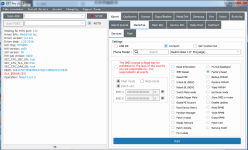
Waiting for MTK port: 142

Driver Info: MediaTek Inc.

Driver version: 3.2.0.0

Driver date: 1-22-2016

HW Chip: MT6895

HW version: ca00

SW version: 00

HW sub version: 8a00

SEC_CFG_SBC_EN: true

SEC_CFG_SLA_EN: true

SEC_CFG_DAA_EN: true

MEID: 0x8347EF295B49DE07D2C1DB5E2D1AC945

SLA_ERROR (53)

Operation: failed 5.0.0.5
 

Hekim

Moderator
Joined
May 6, 2022
Messages
318
Reaction score
109
Points
43
Location
Mardin
redmi note 11T pro Not supportedView attachment 1788

Waiting for MTK port: 142

Driver Info: MediaTek Inc.

Driver version: 3.2.0.0

Driver date: 1-22-2016

HW Chip: MT6895

HW version: ca00

SW version: 00

HW sub version: 8a00

SEC_CFG_SBC_EN: true

SEC_CFG_SLA_EN: true

SEC_CFG_DAA_EN: true

MEID: 0x8347EF295B49DE07D2C1DB5E2D1AC945

SLA_ERROR (53)

Operation: failed 5.0.0.5
The error you're encountering, SLA_ERROR (53), in the DFT Pro tool typically occurs due to a security handshake failure with MediaTek devices. Here's a breakdown of potential reasons and fixes for the error:
"First, try change the USB cable and try again"

Reasons for SLA_ERROR (53):​

  1. Authentication Failure: The Secure Authentication (SLA) between the tool and the device may have failed. MediaTek devices often have security checks that block unauthorized flashing tools.
  2. Incompatible DA File: The DA (Download Agent) file used by the tool might not match the phone’s specific chipset (MT6895 in this case).
  3. Bootloader Locked: If the device’s bootloader is still locked, flashing or certain operations will be restricted, causing errors.
  4. Driver Issues: There might be issues with the installed MediaTek drivers (Driver version 3.2.0.0 is shown in the tool). Sometimes, incompatible or outdated drivers can lead to SLA errors.
  5. SLA Disabled in Tool Settings: Some tools have an option to enable or disable SLA/DA authorization. If it’s disabled, the process can fail.

Potential Fixes:​

  1. Try Another DA File: Ensure you are using the correct custom DA file for your device. You can try searching for a reliable source for your specific device (Redmi Note 11T Pro).
  2. Unlock Bootloader: Make sure the device’s bootloader is unlocked. If it is locked, you won’t be able to proceed with flashing or repairing tasks.
  3. Update Drivers: Install the latest MediaTek USB drivers from a trusted source and restart your system to ensure proper communication between the tool and the device.
  4. Enable SLA in Settings: Some tools have settings to enable SLA. Double-check the settings within DFT Pro to ensure SLA authorization is turned on.
Following these steps should help resolve the error.
 
Last edited:
Top